





Choosing an ergonomic office chair is less about finding the model with the longest feature list and more about finding a chair that fits your body, desk and working habits. A chair can be well made and highly adjustable but still feel wrong if the seat is too deep, the armrests collide with your desk or the lumbar support cannot reach the right position.
This guide explains what to measure, which adjustments matter most and how to test a chair before you decide. An ergonomic chair can support comfort and make it easier to change posture, but it is not a medical treatment and it cannot replace regular movement.
Start with your body measurements
Before comparing materials or optional features, check whether the chair's basic dimensions suit you. Product specifications are most useful when you compare them with three simple measurements:
- Lower-leg height: measure from the floor to the crease behind your knee while wearing the shoes you normally use at work.
- Thigh length: measure from the back of your hips to the crease behind your knee.
- Hip width: measure across the widest point while seated, then allow some clearance on both sides.
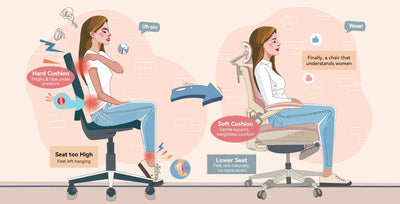
The seat should let you place your feet securely on the floor while keeping your knees at roughly hip level. If your desk requires a higher seat position, a stable footrest can help support your feet. When you sit against the backrest, the front of the seat should not press into the backs of your knees. Adjustable seat depth is especially useful when a chair will be shared or when standard seats tend to feel too long or too short.
For more specific fit considerations, see our guides to choosing an office chair for petite users and taller users.
Prioritise the essential adjustments
Not every adjustment has equal value. Start with the controls that determine whether the chair can support a neutral, relaxed working position.
Seat height
Seat height should be easy to change while seated. Your feet should be supported and your thighs should not be pushed sharply upward or left sloping steeply downward. Also check whether the resulting elbow height works with your desk and keyboard.
Seat depth
A seat-depth slider helps you use the backrest without the seat edge pressing behind your knees. A practical check is to sit fully back and confirm that you can place a few fingers between the seat edge and the back of your legs without losing thigh support.
Lumbar support
Lumbar support should meet the lower-back curve without creating a hard pressure point. Height adjustment is often more important than maximum firmness because the support needs to reach the correct area. If available, test both height and depth or tension. Learn more in our guide to choosing adjustable lumbar support.
Armrests
Armrests should allow your shoulders to remain relaxed and your elbows to stay close to your body. They should also move low enough—or out of the way—so you can approach the desk without reaching forward. Width, depth and pivot adjustments can be valuable when you alternate between typing, using a mouse and reclining. Our adjustable armrest guide explains the main options.
Recline and backrest tension
A useful recline mechanism supports more than one working position. Check whether the tension suits your body weight, whether the movement feels controlled and whether you can return upright without effort. A chair should make posture changes easier rather than locking you into one supposedly perfect position all day.
Decide whether you need a headrest
A headrest is not essential for every desk task. It is most useful when you recline, take reading breaks or want occasional support behind the head. It should adjust to meet the back of the head or upper neck without pushing your head forward. If the headrest cannot reach the right position, it may be better to choose a chair without one. See our guide to chair headrests and neck support for a closer look.
Match the chair to your desk and daily routine
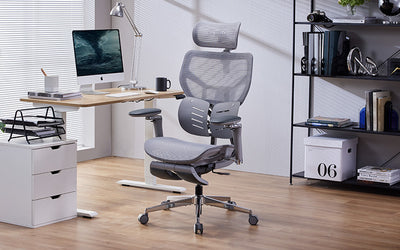
A chair does not work in isolation. Measure the underside of your desk and note any drawers, support rails or thick desktop edges. The armrests and seat must fit underneath or close enough to the work surface for you to use the keyboard without leaning forward.
Think about how you work throughout the day:
- For focused keyboard work, prioritise stable feet, relaxed shoulders and close access to the desk.
- For calls, reading or review work, a controlled recline and supportive backrest may be more valuable.
- For a shared workstation, prioritise intuitive controls and a wide adjustment range.
- For a sit-stand desk, make sure the chair and desk height ranges work together.
Even with a well-fitted chair, vary your posture and take regular opportunities to stand or move. Our guide to managing long periods of sitting offers practical ideas.
Compare mesh, fabric and cushioning
Material choice affects temperature, feel, cleaning and long-term comfort, but no single material is automatically best for everyone.
- Mesh backrests can improve airflow and provide flexible support. Check that the frame does not create pressure at the edges.
- Cushioned seats can distribute pressure comfortably, but softness alone does not guarantee support. Sit long enough to notice whether you sink too far or feel the base underneath.
- Upholstered backrests may feel softer and warmer. Consider the room temperature and cleaning requirements.
Also examine the base, casters and adjustment controls. Casters should match your floor type, the base should feel stable, and the controls should be reachable without twisting awkwardly.
Test the chair before deciding
If possible, spend at least 10 to 15 minutes adjusting and using the chair. If you are buying online, compare the same checks with the published dimensions, return terms and assembly information.
- Sit fully against the backrest and set the seat height.
- Check that your feet are supported and the seat edge does not press behind your knees.
- Position the lumbar support so it feels supportive rather than forceful.
- Set the armrests without lifting your shoulders or spreading your elbows.
- Recline and return upright several times.
- Move close to a desk and test your normal typing and mouse position.
- Check for unstable movement, difficult controls, unwanted pressure or distracting noise.
Check specifications, warranty and returns
Marketing labels such as “ergonomic” do not tell you whether a chair will fit. Compare verified seat-height range, seat depth, seat width, adjustment types, maximum load, warranty coverage and return conditions. Confirm whether measurements refer to the usable seating area or the chair's external dimensions.
For online purchases, a clear return policy matters because body fit cannot be judged from photographs alone. Keep the packaging until you have assembled, adjusted and tested the chair according to the seller's instructions.
Common mistakes to avoid
- Choosing by appearance alone: attractive design cannot compensate for the wrong seat dimensions.
- Assuming more adjustments always mean a better fit: useful range and easy controls matter more than feature count.
- Ignoring the desk: a suitable chair can still create a poor working position if the desktop is too high or the armrests block access.
- Using very firm lumbar support to correct discomfort: strong pressure is not the same as appropriate support.
- Expecting a chair to solve pain: persistent or worsening symptoms should be discussed with a qualified healthcare professional.
Quick ergonomic chair checklist
- Your feet can rest securely on the floor or a footrest.
- The seat supports your thighs without pressing behind your knees.
- The backrest and lumbar support meet your body in the right place.
- The armrests allow relaxed shoulders and close desk access.
- The recline feels controlled and supports posture changes.
- The chair fits under or close to your desk.
- The dimensions, load rating, warranty and returns are clearly documented.
Frequently asked questions
What is the most important ergonomic chair adjustment?
Seat height is the starting point because it affects foot support, knee position and how your arms meet the desk. Seat depth and lumbar-support position are also critical for body fit.
Do I need a headrest?
Not necessarily. A headrest is most useful when reclining or taking short breaks. It should reach the back of your head without pushing it forward.
Is mesh better than a cushioned seat?
Neither is universally better. Mesh may offer more airflow, while cushioning can feel softer. Construction, pressure distribution, room temperature and personal preference all matter.
How much space should be behind my knees?
You need enough clearance to avoid pressure from the seat edge while keeping your thighs supported. A few fingers of space is a practical starting check, but comfort and full backrest contact are more important than one exact number.
Can an ergonomic chair prevent back pain?
A well-fitted chair can support comfortable working positions and make posture changes easier, but it cannot guarantee that pain will be prevented or treated. Work habits, movement, desk setup and individual health factors also matter.
Find a chair that fits your workspace
Use your measurements and the checklist above to compare models rather than relying on a generic “ergonomic” label. Explore the MUSSO ergonomic office chair collection and check each product page for current dimensions, adjustment features, warranty information and availability.